Spark Logic

New SdFat library (with and without DMA)

victor_pv

***Latest Update 04/10/2017***
The code in the official repo from Bill Greyman has now the support for the libmaple based core (stm32duino) integrated in it. So no need to download it from my repo any more.

Official SD-Fat library repository:
https://github.com/greiman/SdFat

===============================================================

UPDATE TO THIS WARNING. SHOULD BE SOLVED IN THE LATEST REPO. If you have problems using pin 7 for CS, make sure you are in sync with Roger’s master STM32Duino repo.
WARNING!!
I was just testing an SD card with one of the sketches, and noticed that you CAN NOT use pin 7 in the maple mini (the stm32f103 native SS pin for spi1) for CS. I have not looked at how the library manages CS and how that pin is setup in out SPI library, but I guess there is a conflict in the pin mode. So the work around at the moment is to use a different pin for CS.
– Updated 06/04/2015-

– New update on 07/10/2015 – Small code changes to the library and specially to the SPI library, which should go to Roger’s master repo soon.

So as I posted before in the forum, I modified the latest SdFat library from Greiman.
I had submitted him changes for a previous version, but had issues. Now all the issues seem to be corrected in my latest version.
It is available here:
https://github.com/victorpv/SdFat

It seems to work fine for me for the few examples I have tested.
If you want the best performance for large transfers, can use DMA mode.

DMA would be advantageous for large transfers, but doesn’t help at all, and may even have a penalty, if you are just reading a few bytes to a log and things like that. Now if you transfer images or mp3 files from the sdcard, DMA can improve performance greatly, anything involving big blocks at once.

DMA can be enabled or disabled editing SdSpiSTM32F1.cpp, there is one #define line:
/** Use STM32 DMAC if nonzero */
#define USE_STM32F1_DMAC 1

Comment that line or change the 1 for 0, and DMA transfers will not be used.

RECOMMENDATIONS FOR SPEED:
Use DMA mode.
Set a bigger buffer, ideally 4KB

Read speeds without DMA, 4KB buffer:
read speed and latency
speed,max,min,avg
KB/Sec,usec,usec,usec
676.29,8189,5927,6056
676.38,7467,5927,6054
676.38,7468,5927,6054
676.38,7469,5926,6054
676.38,7472,5926,6054
Replies14

SanjuPrakash Sun Oct 30, 2016 11:08 am

stevestrong wrote:I suggest to use as basis the “RawWrite” example, this is suitable for fast SD card writing, with or without FAT support.
The latest SDFat-beta from greiman should also work, but not tried yet.
I am currently working with a modified version of it, DMA-based double-buffered analog acquisition and storage (while DMA writes the data fro ADCs to one buffer, the other buffer being written onto SD card, I think I already posted somewhere an example).
I achieve ~350kBps (4 analog channels, dual simultaneous conversion using ADC1 and ADC2 in parallel, 12bits/channel, 44.1kHz sampling frequency, 1 second) without losing a byte, but without FAT support.
Now struggling to achieve fast read out speed from the card without DMA…

stevestrong Mon Oct 31, 2016 9:16 am

Here is an older but still working version, good for getting accommodated with the basics.
There is an “issue” in the (older) SDfat lib, because if you want to go without FAT or any other file system, the sd.begin() function returns an error.
You just have to disregard this error, and it will work fine only using cacheClear, writeStart, writeData, writeStop functions (also see the SDFat lib reference documents). This way you write the data directly to card block-wise in an incremental way.
For block-wise incremental raw reading (w/o FAT) I use readStart, readData, readStop functions.
I will soon update the file when I get the upload (from SD card to PC over USB serial) running as fast as possible.

sherinkapotein Fri Apr 14, 2017 10:01 pm

Having come from the Arduino lineup, had always read about how the DMA could improve some mundane but necessary tasks as logging data to SD card. Finally being handed over with a bluePill along with 3V3 SD card module (gawd why are they so tough to get) I’d thought why don’t give it a try.
Now that the course of the evening was decided I thought might as well document my findings here.

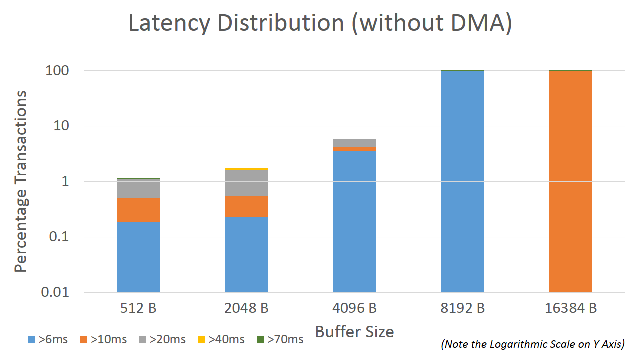
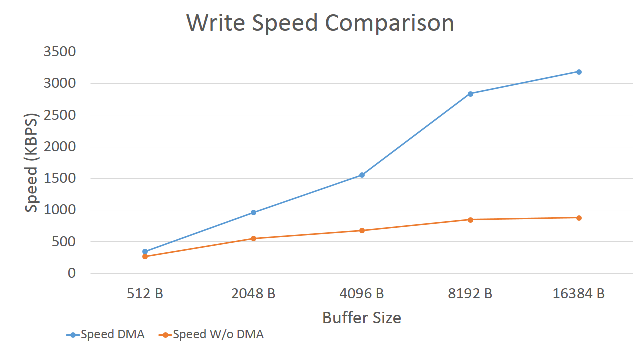
Following are the results from example file bench of the SdFat library by Bill Grieman.

SD card = SanDisk Class 10 32GB (02/2015)
Size of file to be written = 10MB
Tested with varying buffer sizes from 512B to 16KB (yes I did try that too ) with and without DMA.

The card was formatted after every run using the SD formatter utility developed by SD association and SPI speed set to Full speed.
The figures are averaged out over two runs for each test

As can clearly be seen that DMA does accelerate the process for a sufficiently sized buffer reaching speeds upto 3.2MBPS. Even the implementation without DMA for an 8KB buffer gave 3x performance beyond which the law of diminishing returns kicked in.

sped_wR.PNG
sped_wR.PNG (21.18 KiB) Viewed 1119 times

sherinkapotein Fri Apr 14, 2017 10:17 pm

dma_disT.PNG
dma_disT.PNG (22.2 KiB) Viewed 1118 times

sherinkapotein Fri Apr 14, 2017 11:06 pm

pito wrote:I did 3.5MB/sec @36MHz SPI with only 512bytes large buffer. Reported somewhere in this thread..

Pito Sat Apr 15, 2017 8:11 am

You need the latest SdFat-beta and also do mind to enable the EX mode in SdFatConfig.h..

stevestrong Sat Apr 15, 2017 8:13 am

What is EX bringing more than the “normal” beta?

Pito Sat Apr 15, 2017 8:17 am

Xtimes faster wr/rd speed.. sherinkapotein will test it :)

nicolas_soundforce Sun Aug 06, 2017 5:35 pm

I want to read 2 files at the same time. Can I just file.open() 2 files in parallel ? I am having problems at the moment and it doesn’t work as expected.

stevestrong Sun Aug 06, 2017 6:31 pm

Would you be able to help if you read what you have written? I dont owm any magic ball…

victor_pv Mon Aug 07, 2017 2:04 am

[nicolas_soundforce – Sun Aug 06, 2017 5:35 pm] –
I want to read 2 files at the same time. Can I just file.open() 2 files in parallel ? I am having problems at the moment and it doesn’t work as expected.

you need to declare 2 “file” objects, for example file1 and file2, then you can work on each separately:
file1.open()
file2.open()
file2.read...

nicolas_soundforce Tue Aug 08, 2017 9:02 pm

Thanks Victor, that worked without any problems.

Sign in to reply